

Staff and guest Wi-Fi for campuses, hostels and hotels
Campuses, hostels and hotels need Wi-Fi that hundreds of people can use at once without reaching the systems that run the place. Nexapp gives staff, students and guests separate SSIDs and VLANs on Instaroute routers, with per-SSID isolation and the InstaWave captive portal for guests. Domain filtering blocks unwanted sites, a 4G or 5G path backs up the main line, and every campus, study centre and property is managed from Instaroute SDWAN Lite 2.0.
By Pradeep Tomar, Founder and CEO. Published , last reviewed .At a glance
- Industry
- Schools, colleges, hostels, hotels
- Users
- Staff, students, guests and visitors
- Products
- Enterprise Wi-Fi, InstaWave, Instaroute, SDWAN Lite 2.0
- Routers
- IRX100-5G, IRX100-5Gv2, IR11004GSW
How does the network connect?
Site equipment connects to an Instaroute IRX100-5G, which carries the traffic over Fibre or broadband and 4G/5G backup inside a quantum-safe tunnel to Campus or group data centre and Internet. Nothing on site accepts inbound connections.
What problem does it solve?
One campus or hotel network carries the ERP, fee or front-desk systems, CCTV and hundreds of personal phones at the same time. When everyone shares one SSID, a guest's laptop sits on the same network as the billing server.
Schools must keep unwanted sites off student devices, hotels must keep guests apart from each other, and both need to know who signed in. Remote classrooms, exam venues and outlying properties add sites that the same small IT team has to run.
How does Nexapp solve it?
Separate, secure Wi-Fi for staff, students and hotel guests: InstaWave captive portal, per-SSID isolation, domain filtering and 4G/5G backup, from one console.
One SSID per group
Staff, students, guests, labs and CCTV each get their own SSID or wired segment and VLAN, with per-SSID isolation so devices on the guest network cannot see each other.
Sign-in that fits the user
Guests and visitors sign in through the InstaWave captive portal. Staff use their own SSID, and the IRX100 5G models support 802.1X on the LAN switch for wired devices.
Filtering and protection on the router
Domain filtering blocks the sites you list, and the zone firewall with SPI and DoS protection guards the ERP, front-desk and CCTV segments. A guest VLAN with QoS keeps visitors from crowding out campus systems.
Every campus and property in one console
Each site gets a 4G or 5G path beside the main line, with link backup on health checks, and a dual-SIM IRX100 5G router can be the only link for a temporary exam centre or remote classroom. All of them are managed from Instaroute SDWAN Lite 2.0.
Encrypted end to end
IPsec IKEv2 tunnels on NexappOS with hybrid post-quantum key exchange (ML-KEM, NIST FIPS 203), on by default, back to the control centre.
How is the site secured in the AI era?
Security is a requirement, not an add-on. AI helps attackers find exposed devices and weak access faster than ever, so this design exposes nothing, encrypts every link and checks every person who connects.
Nothing exposed to the internet
The router opens only outbound, encrypted connections. Equipment on site has no public IP and accepts no inbound connections, so automated scanners have nothing to find. Zero trust access
Quantum-safe encryption on every link
Traffic travels in IPsec IKEv2 tunnels with hybrid ML-KEM key exchange, so data captured today cannot be decrypted later. Post-quantum cryptography
Zones, not one flat network
Staff Wi-Fi, student or guest Wi-Fi and ERP, front desk, CCTV sit in their own zones behind the zone firewall, so one compromised device cannot reach the rest. IoT and OT security
Access for people, not networks
Engineers and vendors connect through InstaAccess to the named equipment they support, and every session is logged. SSE and ZTNA
Signed, staged firmware
Instaroute SDWAN Lite 2.0 rolls out post-quantum-signed firmware to a canary group first, with rollback, so a bad update never reaches every site at once. Instaroute SDWAN Lite 2.0
AI that waits for your approval
NexParth AI spots problems and proposes the fix, and nothing changes until a person approves it. NexParth AI
What does the SDWAN Lite dashboard show?
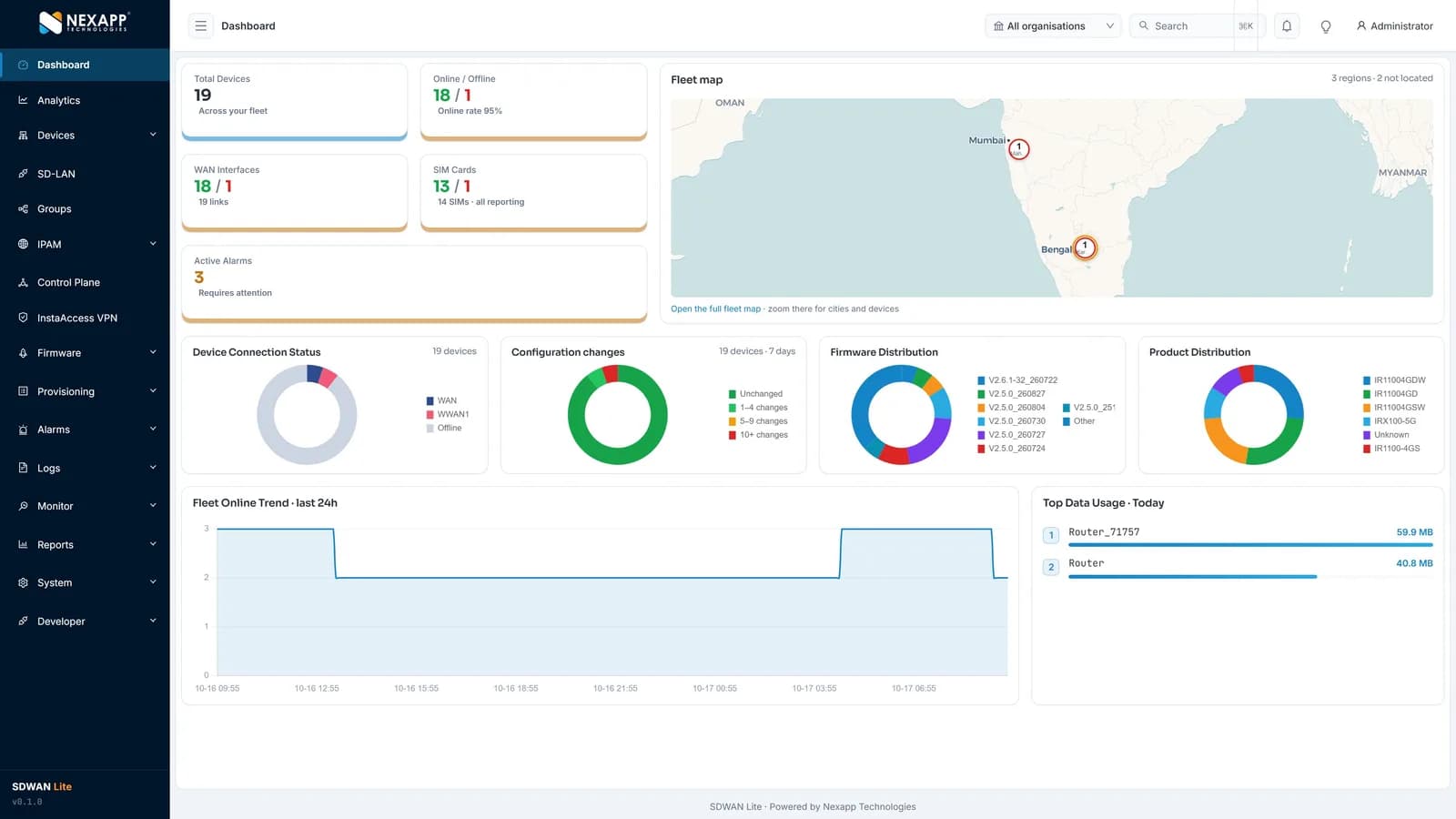
One screen shows the whole fleet: total devices and online rate, WAN links and SIM cards, active alarms, a fleet map, firmware versions, configuration changes, product mix and data usage. Instaroute SDWAN Lite 2.0 manages up to 100,000 routers per deployment, hosted by Nexapp in India or self-hosted.
How is it deployed?
A typical rollout takes 5 steps, and routers configure themselves when they are powered on at site.
Survey the site
List buildings, user groups, applications and links, and note the halls, hostel blocks or floors that need extra coverage.
Design the networks
Define SSIDs, VLANs and zones for staff, students, guests, labs and CCTV, and the domains to block.
Deploy
Routers come online zero-touch, and guests sign in through the InstaWave captive portal.
Connect every site
Each campus, study centre and property gets its own router with a cellular backup; remote classrooms run on dual-SIM IRX100 5G routers.
Operate
Your IT team uses alarms and reports, or the 24×7 NOC in Pune runs the network.
What does the specification ask for, and how does Nexapp meet it?
These are the requirements buyers and tenders usually set for this application, and the Nexapp capability that meets each one today.
| Requirement | How Nexapp meets it |
|---|---|
| Separate staff, student and guest networks | SSID and VLAN per group, per-SSID isolation, guest VLAN with QoS |
| Wired device authentication | 802.1X on the LAN switch of IRX100 5G models |
| Guest and visitor access | InstaWave hotspot with captive portal |
| Block unwanted sites | Domain filter on the router |
| Protect campus systems | Zone firewall, SPI and DoS protection |
| Several campuses or properties | 4G/5G link backup on health checks; zero-touch rollout from SDWAN Lite 2.0 |
Which Instaroute router should you use?
For most sites, use the IRX100-5G. Dual-band Wi-Fi 6 (AX3000-class), Gigabit ports and 802.1X for main buildings.
IRX100-5G
Dual-band Wi-Fi 6 (AX3000-class), Gigabit ports and 802.1X for main buildings.
- Cellular
- 5G SA/NSA, sub-6 GHz
- SIM slots
- 2
- RS232 / RS485
- RS232 and RS485 (up to 3 ports)
- Mounting
- Desktop or wall
IRX100-5Gv2
Two operators live at once for remote classrooms and exam centres.
- Cellular
- 5G SA/NSA, sub-6 GHz
- SIM slots
- 2
- RS232 / RS485
- RS232 and RS485 (up to 3 ports)
- Mounting
- Desktop or DIN-rail
IR11004GSW
4G with 2.4 GHz Wi-Fi, five ports, zone firewall and domain filtering for small hostels and guest houses.
- Cellular
- 4G LTE Cat 4 or Cat 6
- SIM slots
- 1
- RS232 / RS485
- RS232 and RS485
- Mounting
- Desktop or wall
Also used: Enterprise Wi-Fi · Instaroute SDWAN Lite 2.0
What are the benefits?
- Guests and students never share a network with the ERP, front desk or CCTV.
- Guests sign in through the InstaWave captive portal, on a network of their own.
- Unwanted sites are blocked by domain filtering on the router.
- Wi-Fi, WAN and security sit with one vendor and one support line.
- Remote classrooms and temporary venues go live on cellular, zero-touch.
Why choose Nexapp?
- Indian OEM in Pune since 2014, with its own NexappOS and controller
- Class-I local supplier under the PPP-MII Order
- TEC MTCTE certificate 244903206 for nine Instaroute models
- Quantum-safe on every connection: hybrid ML-KEM and ML-DSA
- 24×7 NOC in Pune; hosted in India or self-hosted
- 75,000+ devices deployed for 400+ enterprise and banking customers
Frequently asked questions
Can guests and staff have separate Wi-Fi on the same router?
Yes. Each group gets its own SSID and VLAN with per-SSID isolation, and guest traffic gets its own VLAN with QoS.
What is InstaWave?
InstaWave is Nexapp's hotspot and guest Wi-Fi service, which signs visitors in through a captive portal on a separate guest network.
Can the router block unwanted websites?
Yes. Domain filtering on the router blocks the sites you list for the network, and Nexapp SSE can extend web policy to managed devices off campus.
Does Nexapp supply access points for large halls and hostels?
Yes, dedicated access points are available on request. Instaroute routers also include Wi-Fi, dual-band Wi-Fi 6 on the IRX100 5G models, and for lecture halls, hostel blocks and hotel floors we plan access-point positions with you.
How are remote classrooms and exam centres connected?
A dual-SIM IRX100 5G router comes online zero-touch from Instaroute SDWAN Lite 2.0, so a temporary site is online the day the router arrives.
Read next
Planning a similar deployment?
Tell us your sites, devices and links, and a Nexapp engineer will recommend the routers and design.
Related use cases
Enterprise
4G/5G failover for branch offices4G/5G failover routers for NBFC, insurance, service and sales branch offices: dual-SIM backup, link load balancing and zero-touch rollout from one console.
Enterprise
Network connectivity and segmentation for hospitals and clinicsConnect hospitals, clinics and diagnostic centres with 4G/5G backup links, keep medical devices in their own zone and run guest Wi-Fi apart, from one console.
Enterprise
Secure remote access for building management systemsReach BMS, HVAC, lift, DG and boiler controllers remotely over 4G: Modbus and serial support, vendor access through ZTNA, and building systems kept apart.