

Secure remote access for building management systems
Facility teams and equipment vendors need to reach BMS, HVAC, lift, DG and boiler controllers without a site visit and without opening the building network. An Instaroute router connects those controllers over Ethernet or RS232/RS485, carries Modbus and serial data over its own 4G link, and lets each vendor reach only its own equipment through the InstaAccess client. Building systems stay in their own segment, away from office IT.
By Pradeep Tomar, Founder and CEO. Published , last reviewed .At a glance
- Industry
- Commercial buildings, malls, hospitals, campuses
- Equipment
- BMS, HVAC, lifts, DG sets, boilers
- Interfaces
- Ethernet, RS232/RS485, Modbus RTU/ASCII/TCP
- Routers
- IR1190DMG, IR11004GS
How does the network connect?
Site equipment connects to an Instaroute IR1190DMG, which carries the traffic over SIM 1 · Operator A and SIM 2 · Operator B inside a quantum-safe tunnel to Facility team and Equipment vendors via InstaAccess. Nothing on site accepts inbound connections.
What problem does it solve?
Chillers, lifts, DG sets and boilers come from different makers, and each maker wants remote access for alarms and support. That usually ends in modems left on panels, remote-desktop tools on the BMS PC or a port opened on the building's internet line.
Building controllers often run old firmware and share a flat network with office PCs and CCTV, so one weak point exposes the rest. Facility managers also have no record of who connected to which system and when.
How does Nexapp solve it?
Reach BMS, HVAC, lift, DG and boiler controllers remotely over 4G: Modbus and serial support, vendor access through ZTNA, and building systems kept apart.
Speaks the site's protocols
RS232/RS485 serial ports, a Modbus RTU/ASCII/TCP gateway, DNP3, IEC 60870-5-101/104 and an MQTT publisher, so existing controllers, RTUs and meters connect without replacement.
Its own link, separate from office IT
The router's 4G link carries building-system traffic on a path of its own, so building controllers do not depend on, or sit on, the office network.
Vendor access without open ports
Engineers and equipment vendors connect through the InstaAccess client (ZTNA, SSL VPN or IPsec VPN) to only the equipment they support, and every session is logged.
Building systems in their own zone
The zone firewall separates BMS, lift and DG networks from each other and from office IT, so access to one controller is not access to the building.
Works without a public IP
Mobile SIMs in India usually sit behind carrier-grade NAT. The router builds outbound encrypted tunnels and an always-on management channel, so nothing on site has to accept inbound connections.
One console for every site
Instaroute SDWAN Lite 2.0 shows the health, signal and data usage of every router, with zero-touch set-up and canary firmware rollout, for up to 100,000 devices per deployment. Run it Nexapp-hosted in India or self-hosted.
How is the site secured in the AI era?
Security is a requirement, not an add-on. AI helps attackers find exposed devices and weak access faster than ever, so this design exposes nothing, encrypts every link and checks every person who connects.
Nothing exposed to the internet
The router opens only outbound, encrypted connections. Equipment on site has no public IP and accepts no inbound connections, so automated scanners have nothing to find. Zero trust access
Quantum-safe encryption on every link
Traffic travels in IPsec IKEv2 tunnels with hybrid ML-KEM key exchange, so data captured today cannot be decrypted later. Post-quantum cryptography
Zones, not one flat network
Each group of equipment on site gets its own zone behind the zone firewall, so one compromised device cannot reach the rest. IoT and OT security
Access for people, not networks
Engineers and vendors connect through InstaAccess to the named equipment they support, and every session is logged. SSE and ZTNA
Signed, staged firmware
Instaroute SDWAN Lite 2.0 rolls out post-quantum-signed firmware to a canary group first, with rollback, so a bad update never reaches every site at once. Instaroute SDWAN Lite 2.0
AI that waits for your approval
NexParth AI spots problems and proposes the fix, and nothing changes until a person approves it. NexParth AI
What does the SDWAN Lite dashboard show?
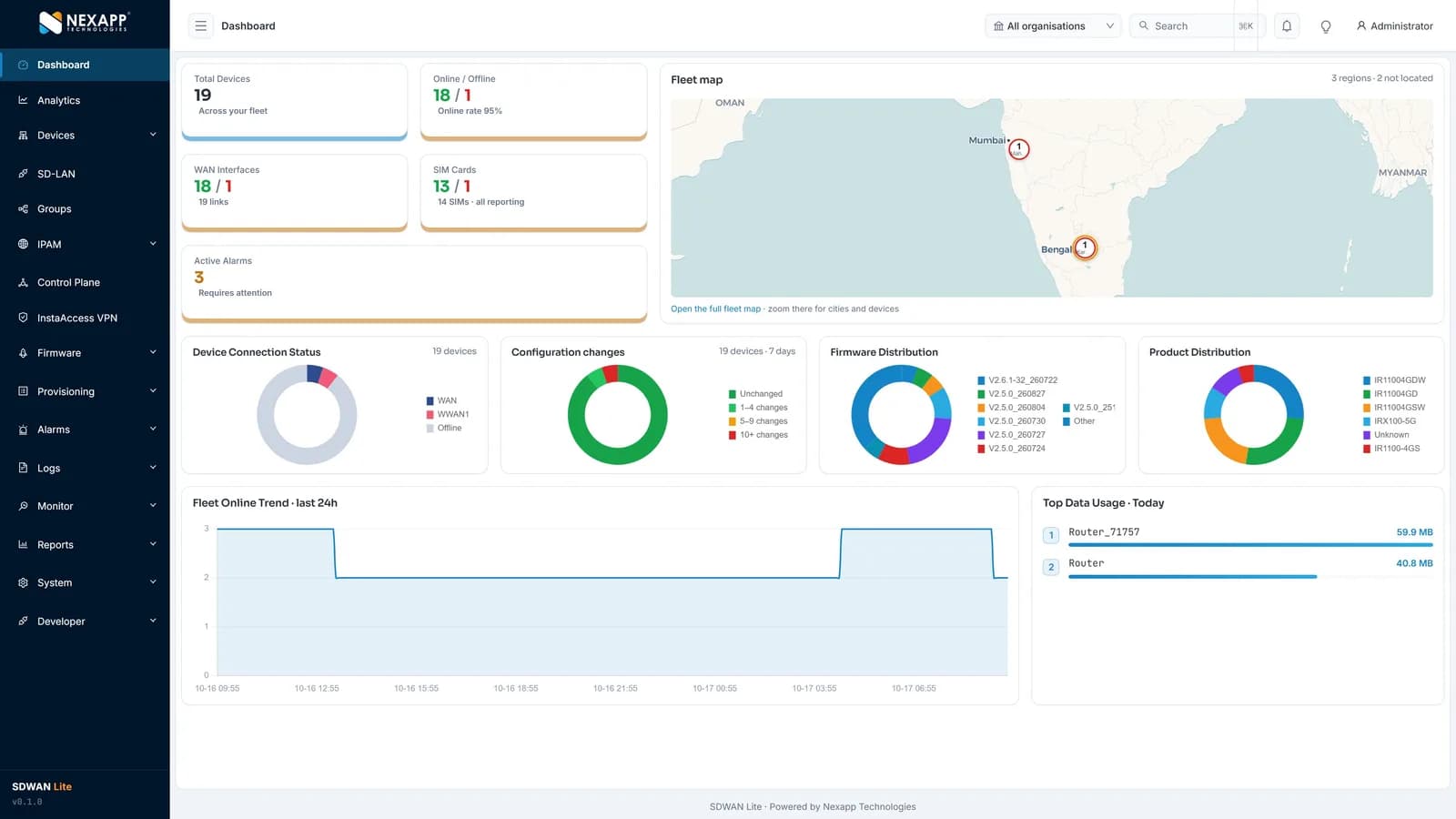
One screen shows the whole fleet: total devices and online rate, WAN links and SIM cards, active alarms, a fleet map, firmware versions, configuration changes, product mix and data usage. Instaroute SDWAN Lite 2.0 manages up to 100,000 routers per deployment, hosted by Nexapp in India or self-hosted.
How is it deployed?
A typical rollout takes 4 steps, and routers configure themselves when they are powered on at site.
List the building systems
Note each controller (BMS, HVAC, lifts, DG, boilers), its interface (Ethernet or serial) and the vendor that supports it.
Install the router in the panel
Mount the DIN-rail router, connect controllers over Ethernet or RS232/RS485, insert SIMs and power on; it configures itself zero-touch.
Separate the zones
Put each building system in its own zone, apart from office IT, and allow only the flows each one needs.
Give vendors scoped access
Each vendor gets an InstaAccess policy for its own equipment; the facility team sees every session.
What does the specification ask for, and how does Nexapp meet it?
These are the requirements buyers and tenders usually set for this application, and the Nexapp capability that meets each one today.
| Requirement | How Nexapp meets it |
|---|---|
| Connect existing serial controllers | RS232/RS485 serial DTU over TCP or UDP |
| Modbus data from meters and panels | Modbus RTU/ASCII/TCP gateway and MQTT publisher |
| No open ports on the building network | Outbound IPsec tunnels over the router's own 4G link |
| Vendor access limited to its equipment | InstaAccess policy per vendor, every session logged |
| Building systems apart from office IT | Zone firewall, ACLs and VLANs on the router |
| Manage many buildings centrally | Instaroute SDWAN Lite 2.0 with alarms, browser SSH and firmware rollout |
Which Instaroute router should you use?
For most sites, use the IR1190DMG. DIN-rail or wall, Gigabit ports, dual SIM and serial, no Wi-Fi: built for panels.
IR1190DMG
DIN-rail or wall, Gigabit ports, dual SIM and serial, no Wi-Fi: built for panels.
- Cellular
- 4G LTE Cat 4 or Cat 6
- SIM slots
- 2
- RS232 / RS485
- RS232 and RS485
- Mounting
- DIN-rail or wall
IR11004GS
Entry-level 4G with RS232/RS485 for a single DG or boiler panel.
- Cellular
- 4G LTE Cat 4 or Cat 6
- SIM slots
- 1
- RS232 / RS485
- RS232 and RS485
- Mounting
- DIN-rail or wall
Also used: InstaAccess client (ZTNA, SSL VPN, IPsec VPN) · Instaroute SDWAN Lite 2.0
What are the benefits?
- Vendors support chillers, lifts and DG sets without a site visit.
- No inbound ports on the building network and no modems left on panels.
- Every remote session is logged with the user and the equipment reached.
- Building controllers are separated from office IT and from each other.
- Existing serial and Modbus controllers connect without replacement.
Why choose Nexapp?
- Indian OEM in Pune since 2014, with its own NexappOS and controller
- Class-I local supplier under the PPP-MII Order
- TEC MTCTE certificate 244903206 for nine Instaroute models
- Quantum-safe on every connection: hybrid ML-KEM and ML-DSA
- 24×7 NOC in Pune; hosted in India or self-hosted
- 75,000+ devices deployed for 400+ enterprise and banking customers
Frequently asked questions
Which BMS protocols does the router support?
The router is a Modbus RTU/ASCII/TCP gateway, publishes data over MQTT and carries RS232/RS485 serial devices over TCP or UDP. IP-based controllers on its LAN are reached through the encrypted tunnel like any other IP device.
Does the router translate BACnet?
No. There is no BACnet gateway on the router. BACnet/IP equipment on the LAN can still be reached through the tunnel or InstaAccess as an IP device.
Can each equipment vendor reach only its own equipment?
Yes. Each vendor connects through the InstaAccess client with a policy limited to its own controllers, and every session is logged.
Do we need a public IP or an open port on the building line?
No. The router builds outbound encrypted tunnels over its own 4G link, so nothing in the building accepts inbound connections.
Can the router switch DG sets or pumps on and off?
Not directly. Commands reach the DG or pump controller over Modbus or serial, and the controller itself switches the equipment.
Read next
Planning a similar deployment?
Tell us your sites, devices and links, and a Nexapp engineer will recommend the routers and design.
Related use cases
Enterprise
4G/5G failover for branch offices4G/5G failover routers for NBFC, insurance, service and sales branch offices: dual-SIM backup, link load balancing and zero-touch rollout from one console.
Enterprise
Network connectivity and segmentation for hospitals and clinicsConnect hospitals, clinics and diagnostic centres with 4G/5G backup links, keep medical devices in their own zone and run guest Wi-Fi apart, from one console.
Enterprise
Staff and guest Wi-Fi for campuses, hostels and hotelsSeparate, secure Wi-Fi for staff, students and hotel guests: InstaWave captive portal, per-SSID isolation, domain filtering and 4G/5G backup, from one console.