

SD-WAN architecture: components, planes and topologies
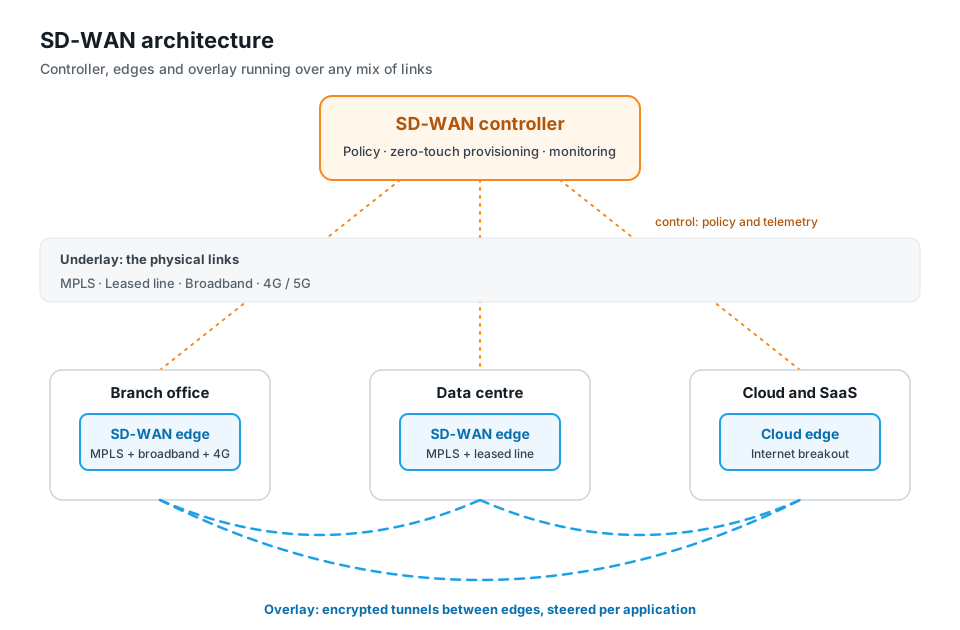
SD-WAN architecture has three main parts: an edge device at every site, a central controller (often called the orchestrator) that holds policy, and gateways or hubs that connect sites to data centres and clouds. The edges build an encrypted overlay of tunnels on top of the physical links, the underlay, and the controller tells each edge how to steer each application across them. The design separates the management, control and data planes, so policy is set once centrally while traffic flows directly between sites. Topology, whether hub-and-spoke, full mesh or a mix, is chosen in the controller rather than wired by hand.
Key facts
| Main components | SD-WAN edge at each site, central controller or orchestrator, gateways and hubs |
| Planes | Management (configuration and monitoring), control (routes, keys, policy), data (the traffic itself) |
| Overlay | Encrypted tunnels, usually IPsec, between edges and hubs |
| Underlay | The physical links: MPLS, internet leased line, broadband, 4G/5G |
| Common topologies | Hub-and-spoke, full mesh, partial mesh, and on-demand (dynamic) mesh |
| Deployment models | Controller on-premises in your DC and DR, or hosted by the vendor; edges as hardware, virtual machines or cloud instances |
| Where security fits | On the edge (firewall, IPS) and in the cloud (SSE); together with SD-WAN this is SASE |
The components of SD-WAN architecture
Every SD-WAN design, whatever the vendor, is built from the same few parts.
SD-WAN edge
The edge is the device at each location. In a branch it is usually a physical appliance, which people often call an SD-WAN router. In a data centre it can be a larger appliance or a virtual machine, and in a public cloud it runs as a virtual instance. Every WAN link at the site terminates on the edge.
The edge does the work on the data path. It builds tunnels, probes each link for loss, latency and jitter, identifies applications with deep packet inspection (DPI) and forwards each flow over the path that policy chooses. On a secured SD-WAN it also inspects traffic for threats.
Controller and orchestrator
The controller is the central brain. It keeps the network-wide policy, distributes routes and encryption keys, and tells each edge which tunnels to build and how to steer each class of traffic. Some products split this into a controller for the control plane and an orchestrator for configuration, monitoring and provisioning. Others combine both in one platform. What matters to the buyer is the same: one place to design the network, admit new sites, push policy and see what is happening.
Gateways and hubs
Gateways and hubs are edges in special roles. A hub sits in a data centre and terminates tunnels from many branches. A cloud gateway sits close to a public cloud or SaaS region and gives branches a short, encrypted path to it. A gateway can also bridge the SD-WAN to sites that still run plain MPLS or IPsec, which helps during migration.
Control, data and management planes
SD-WAN separates three jobs that a traditional router does in one box.
| Plane | What it does | Where it runs |
|---|---|---|
| Management plane | Configuration, zero-touch provisioning, firmware, monitoring, reports and audit logs | The controller or orchestrator console and API |
| Control plane | Route exchange, tunnel set-up, key distribution and steering policy | Between the controller and the edges, often using BGP or OSPF alongside |
| Data plane | Forwarding the actual application traffic over the chosen tunnel or breakout | On the edges, directly site to site or site to hub |
This split is what makes SD-WAN manageable at scale. You change policy once in the management plane, the control plane spreads it to every edge, and the data plane keeps forwarding traffic directly between sites. In most designs, if the controller is briefly unreachable, edges keep forwarding on their last known policy, so user traffic does not depend on the controller being online every second.
Overlay vs underlay
The underlay is the physical transport: MPLS circuits, internet leased lines, broadband, 4G and 5G. Each link has its own operator, cost and behaviour.
The overlay is the virtual network the edges build on top: a set of encrypted tunnels between sites, hubs and clouds. Applications see one private network. The edge decides, flow by flow, which underlay link each tunnel should use at that moment.
Because the overlay is independent of the underlay, you can add a 4G link, retire an MPLS circuit or change operator without redesigning the network. The overlay simply gains or loses a path. This is also how SD-WAN keeps working through link failures: when one underlay link degrades, the tunnels on the other links carry the traffic.
Most overlays use IPsec for encryption. The design question that matters now is how those tunnels exchange keys. Traffic recorded today could be decrypted later if key exchange relies only on classical algorithms, which is why post-quantum key exchange for IPsec is moving into RFPs. See is IPsec quantum-safe?.
SD-WAN topologies: hub-and-spoke vs full mesh
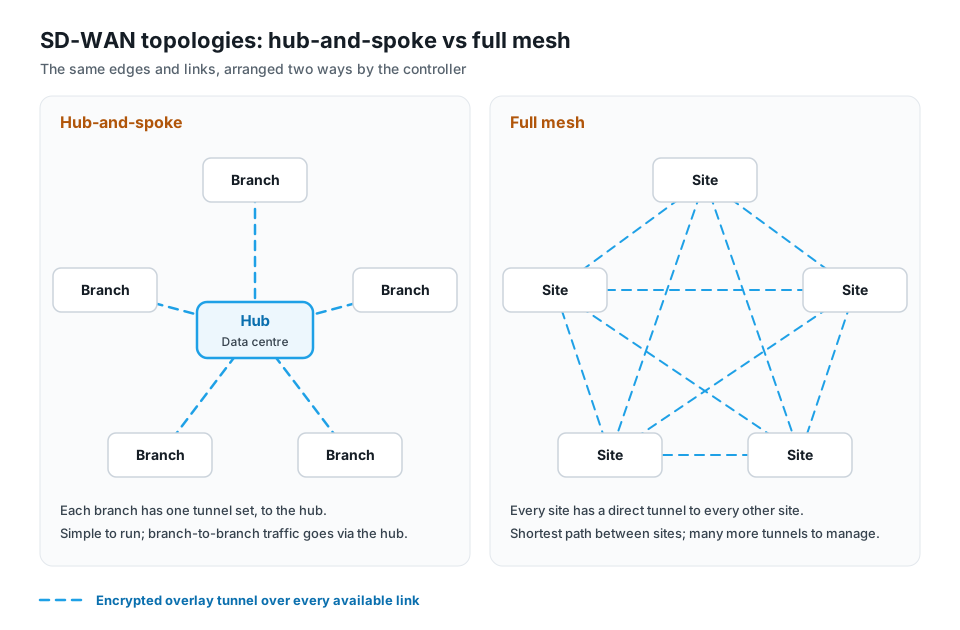
Topology decides which sites build tunnels to which. In SD-WAN it is a setting in the controller, not a set of hand-built tunnels.
| Hub-and-spoke | Full mesh | |
|---|---|---|
| Tunnels | Each branch to one or two hubs | Every site to every other site |
| Branch-to-branch traffic | Passes through the hub | Goes direct |
| Best for | Traffic that mostly goes to the data centre, such as core banking or ERP | Heavy site-to-site traffic, such as voice and video between offices |
| Trade-off | The hub adds a hop and needs capacity | Tunnel count grows quickly as sites are added |
Real networks often mix the two. A partial mesh connects regional offices to each other while small branches stay on hub-and-spoke. An on-demand or dynamic mesh starts as hub-and-spoke and builds a direct tunnel between two branches only when traffic between them appears, then tears it down when it stops. Many Indian bank and retail networks use dual hubs, one in the DC and one in the DR site, so every branch has two paths to the core.
SD-WAN deployment models
Two choices shape how an SD-WAN is deployed: where the controller runs, and what form the edges take.
Controller hosting
- On-premises. The controller runs in your own data centre, usually with a second instance in DR. Management data and logs stay inside your network. Regulated organisations often ask for this.
- Vendor-hosted. The vendor runs the controller for you. For Indian buyers, the question to ask is where it is hosted and where its logs are stored, because CERT-In requires ICT logs to be kept within India for 180 days.
Edge form factors
- Physical appliances for branches, plants and ATMs.
- Virtual machines on your hypervisor, for data-centre hubs and private clouds.
- Cloud instances in public clouds, so cloud workloads join the same overlay as branches.
Breakout design is the third decision. With centralised breakout, internet traffic goes back to the data centre to pass a central firewall. With local breakout, trusted SaaS traffic leaves at the branch, which is faster but means the branch needs its own security. Most designs use local breakout for named SaaS applications and send the rest through central or cloud security.
How security fits into SD-WAN architecture
Encryption alone does not make an SD-WAN secure. Once branches break out to the internet locally, each branch needs the protection the data-centre firewall used to provide.
There are two places to put it:
- On the edge. A secured SD-WAN edge runs firewall, intrusion prevention (IPS), antivirus and web filtering on the same device that steers traffic. One box and one policy cover routing and protection.
- In the cloud. Security service edge (SSE) inspects user and branch traffic in the cloud with ZTNA, secure web gateway, CASB, DLP and firewall as a service. It follows remote users who never touch a branch edge.
SD-WAN plus SSE under one policy is what Gartner calls SASE. You do not have to buy both at once; many organisations start with secured SD-WAN and add SSE later. See SASE vs SD-WAN vs SSE for how to sequence it.
How Nexapp implements SD-WAN architecture
Nexapp SD-WAN Enterprise maps onto this architecture as follows.
| Layer | Nexapp |
|---|---|
| Controller | Nexapp Controller, in your own DC and DR (with controller HA and DC–DR replication) or Nexapp-hosted in India |
| Edges | Nexapp appliances and x86 bare metal, virtual machines on KVM, Hyper-V and VirtualBox, AWS, Azure and Google Cloud, and data-centre hubs, all running NexappOS |
| Topologies | Hub-and-spoke, full mesh (ADVPN) and site-to-site, built with a six-step fabric wizard |
| Routing | BGP with route reflector, OSPF, IS-IS, static routes and VRF |
| Steering | DPI-based application steering to the overlay, local breakout or a gateway; Gold, Silver and Bronze SLA probes; sub-second failover |
| Encryption | IPsec IKEv2 with hybrid classical + ML-KEM key exchange on every tunnel |
| Security | IPS, gateway antivirus, web filtering, anti-spam and InstaShield IP on the edge; NGFW and SSE/ZTNA from the same vendor |
Edges are admitted by serial number and come up with zero-touch provisioning, so a new branch joins the right topology when the box is plugged in. For cellular-only sites, Instaroute 4G and 5G routers are managed from Instaroute SDWAN Lite 2.0; IPS and NGFW come with SD-WAN Enterprise, not with SDWAN Lite 2.0.
Questions to ask about any SD-WAN architecture
- Where does the controller run, and what happens to the data plane if it is unreachable?
- Which topologies are supported, and can hub-and-spoke and mesh be mixed in one network?
- Which routing protocols does the edge speak to your existing MPLS and data-centre routers?
- Can edges run in your hypervisor and your public cloud, not only as hardware?
- Where is security enforced: on the edge, in the cloud, or both, and under one policy?
- How are tunnel keys exchanged, and is post-quantum key exchange available?
- Where are logs stored, and for how long?
For the full buying checklist, see how to choose an SD-WAN provider in India.
Read next: SD-WAN router: what it is and what to check · SASE vs SD-WAN vs SSE · SD-WAN advantages and disadvantages
Further reading: Understanding SD-Branch · SD-WAN for application performance
Frequently asked questions
What is SD-WAN architecture?
SD-WAN architecture is the design of a software-defined WAN: edge devices at each site, a central controller that holds policy, and gateways or hubs, connected by an encrypted overlay of tunnels that runs over any mix of physical links.
What are the main components of SD-WAN?
The SD-WAN edge at each site, the controller or orchestrator that manages policy and configuration, and gateways or hubs in data centres and clouds.
The overlay of encrypted tunnels ties them together.
What is the difference between overlay and underlay in SD-WAN?
The underlay is the physical transport, such as MPLS, leased line, broadband and 4G/5G.
The overlay is the set of encrypted tunnels the edges build on top of those links. Applications see only the overlay.
What are the control plane and data plane in SD-WAN?
The control plane exchanges routes, keys and steering policy between the controller and the edges.
The data plane is the application traffic itself, forwarded by the edges directly between sites or to a hub.
Which is better, hub-and-spoke or full mesh SD-WAN?
Neither is better in general.
Hub-and-spoke suits networks where most traffic goes to the data centre. Full mesh suits heavy branch-to-branch traffic. Many networks mix the two or use an on-demand mesh.
Does SD-WAN stop working if the controller goes down?
In a well-designed SD-WAN, no.
Edges keep forwarding traffic on their last known policy. You lose the ability to change configuration and see live monitoring until the controller is back, which is why controller HA and a DR instance matter.
Where does security sit in SD-WAN architecture?
On a secured SD-WAN, firewall and threat prevention run on the edge itself.
Cloud-delivered SSE can add ZTNA, web and SaaS security for users. Together, SD-WAN and SSE make up SASE.
Designing an SD-WAN for your branches, DC and cloud? Walk through the architecture with an engineer.
24×7 NOC in Pune · 75,000+ devices deployed · 400+ enterprise and banking customers since 2014.