

Transport and logisticsSDWAN Lite
4G/5G connectivity for ferries, boats and vessels near the shore
Ferries, coastal and inland vessels and fishing boats working near the shore can stay online over cellular while they are within coverage. An Instaroute router on board gives the crew and passengers Wi-Fi, carries onboard cameras and sensors to the shore office through encrypted tunnels, and uses two operators to make the most of coastal coverage. Coverage depends on the distance from shore and from the nearest tower, so it suits harbours, rivers, backwaters and coastal routes rather than the open sea.
By Pradeep Tomar, Founder and CEO. Published , last reviewed .At a glance
- Industry
- Ferries, inland water transport, coastal and fishing vessels
- Devices
- Crew and passenger Wi-Fi, cameras, onboard sensors
- Coverage
- Cellular within reach of shore towers
- Routers
- IR1180DM, IRX100-5Gv2, IR1105-ODU-4G
How does the network connect?
Site equipment connects to an Instaroute IR1180DM, which carries the traffic over SIM 1 · Operator A and SIM 2 · Operator B inside a quantum-safe tunnel to Shore office and control room and Fleet console. Nothing on site accepts inbound connections.
What problem does it solve?
Ferry and vessel operators want to see what is happening on board, keep crews in touch and give passengers Wi-Fi, but a phone hotspot on one SIM drops out as the boat moves along the coast or up a river.
Onboard cameras and sensors usually sit behind a mobile SIM with no public IP, so the shore office cannot reach them without an encrypted path.
Cellular coverage over water depends on how far the vessel is from shore and from the nearest tower. Operators need to know when a boat has dropped out of coverage rather than guess.
How does Nexapp solve it?
4G/5G routers for ferries, coastal and inland vessels and fishing boats near shore: crew and passenger Wi-Fi, onboard cameras and sensors, one console.
Two operators along the coast
Dual-SIM arbitration switches operator by signal, latency or data usage, so the vessel uses whichever network reaches it best within coverage of the shore towers.
Wi-Fi for crew and passengers
Crew and passengers get separate SSIDs, with the InstaWave captive portal for passengers and zone firewall rules keeping both away from onboard systems.
Cameras and sensors back to shore
Onboard cameras and Ethernet or serial sensors reach the shore office through encrypted tunnels and SD-LAN, with nothing on the vessel open to the internet.
Know when a vessel is out of coverage
Router alarms for link state, signal and data usage show which vessels are online, and the IR1180DM adds GPS location data, so a quiet boat is visible as a coverage gap.
Encrypted end to end
IPsec IKEv2 tunnels on NexappOS with hybrid post-quantum key exchange (ML-KEM, NIST FIPS 203), on by default, back to the control centre.
How is the site secured in the AI era?
Security is a requirement, not an add-on. AI helps attackers find exposed devices and weak access faster than ever, so this design exposes nothing, encrypts every link and checks every person who connects.
Nothing exposed to the internet
The router opens only outbound, encrypted connections. Equipment on site has no public IP and accepts no inbound connections, so automated scanners have nothing to find. Zero trust access
Quantum-safe encryption on every link
Traffic travels in IPsec IKEv2 tunnels with hybrid ML-KEM key exchange, so data captured today cannot be decrypted later. Post-quantum cryptography
Zones, not one flat network
Each group of equipment on site gets its own zone behind the zone firewall, so one compromised device cannot reach the rest. IoT and OT security
Access for people, not networks
Engineers and vendors connect through InstaAccess to the named equipment they support, and every session is logged. SSE and ZTNA
Signed, staged firmware
Instaroute SDWAN Lite 2.0 rolls out post-quantum-signed firmware to a canary group first, with rollback, so a bad update never reaches every site at once. Instaroute SDWAN Lite 2.0
AI that waits for your approval
NexParth AI spots problems and proposes the fix, and nothing changes until a person approves it. NexParth AI
What does the SDWAN Lite dashboard show?
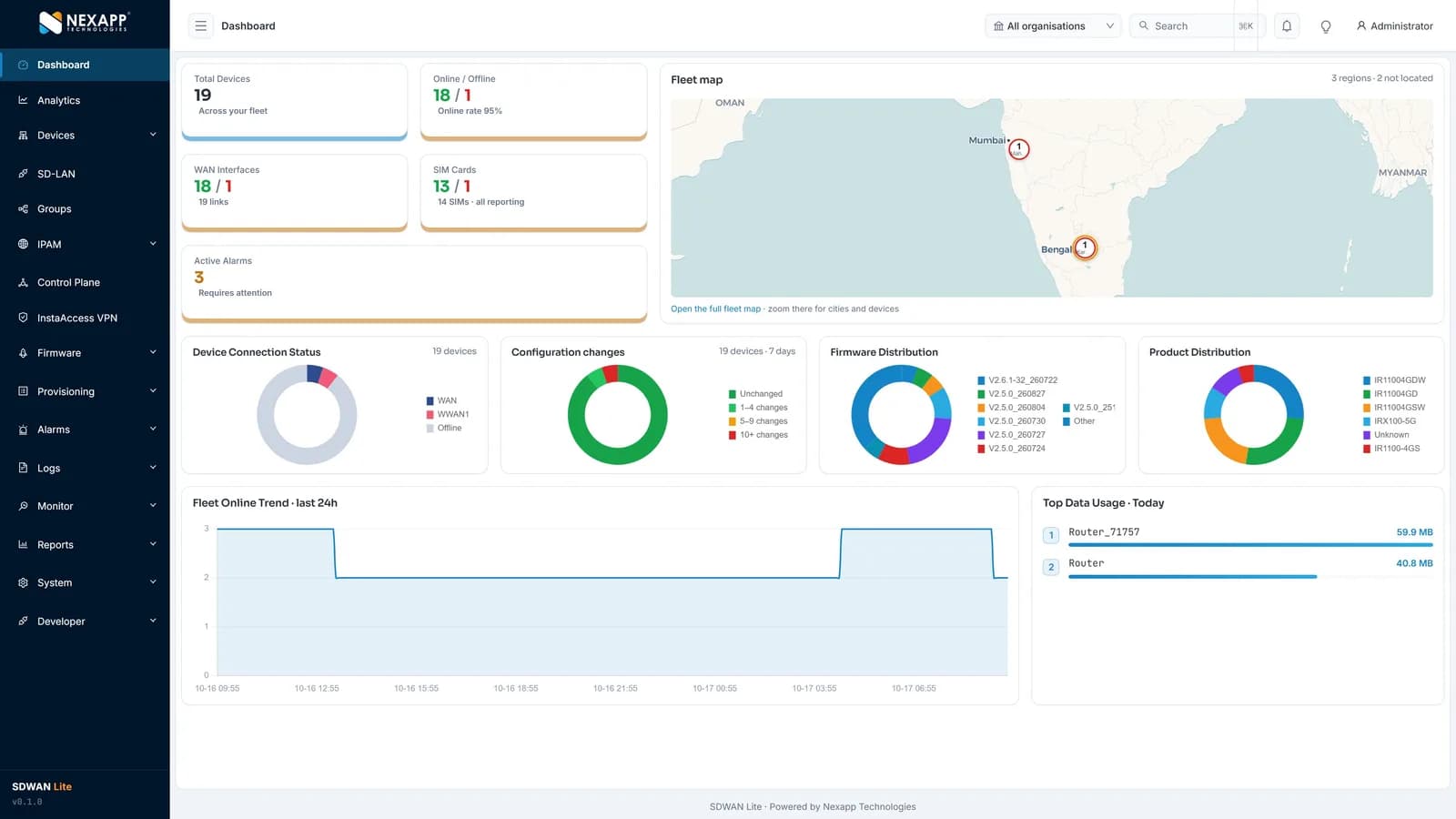
One screen shows the whole fleet: total devices and online rate, WAN links and SIM cards, active alarms, a fleet map, firmware versions, configuration changes, product mix and data usage. Instaroute SDWAN Lite 2.0 manages up to 100,000 routers per deployment, hosted by Nexapp in India or self-hosted.
How is it deployed?
A typical rollout takes 5 steps, and routers configure themselves when they are powered on at site.
Check the route
Test two operators along the vessel's route, at the jetty and at the points farthest from shore, to see where coverage ends.
Plan the install
Choose a model per vessel. Nexapp provides mounting, power input and operating temperature details for each install.
Design the segments
Crew, passengers, cameras and sensors each get their own SSID or VLAN and firewall rules.
Fit and power on
Insert two SIMs and power on; the router pulls its configuration zero-touch.
Watch the fleet
Link state, signal, data usage and location alarms show which vessels are online and which are out of coverage.
What does the specification ask for, and how does Nexapp meet it?
These are the requirements buyers and tenders usually set for this application, and the Nexapp capability that meets each one today.
| Requirement | How Nexapp meets it |
|---|---|
| Best available network near shore | Dual-SIM arbitration by signal, latency or data usage |
| Crew and passenger Wi-Fi | Separate SSIDs; InstaWave captive portal for passengers |
| Cameras and sensors to the shore office | Encrypted tunnels and SD-LAN; serial ports for sensors |
| Vessel location | GPS on the IR1180DM, with location-aware alarms |
| Know when a vessel is out of coverage | Alarms for link state, signal and data usage |
Which Instaroute router should you use?
For most sites, use the IR1180DM. DIN-rail 4G with dual SIM, 2.4 GHz Wi-Fi, RS232/RS485 and GPS for vessel location data.
IR1180DM
DIN-rail 4G with dual SIM, 2.4 GHz Wi-Fi, RS232/RS485 and GPS for vessel location data.
- Cellular
- 4G LTE Cat 4 or Cat 6
- SIM slots
- 2
- RS232 / RS485
- RS232 and RS485
- Mounting
- DIN-rail
IRX100-5Gv2
5G with Wi-Fi 6 for ferries carrying many passengers, with one or two modules.
- Cellular
- 5G SA/NSA, sub-6 GHz
- SIM slots
- 2
- RS232 / RS485
- RS232 and RS485 (up to 3 ports)
- Mounting
- Desktop or DIN-rail
IR1105-ODU-4G
Outdoor IP65 dual-SIM unit for the jetty or ferry terminal, mounted where the signal is best.
- Cellular
- 4G LTE Cat 4 or Cat 6
- SIM slots
- 2
- RS232 / RS485
- No
- Mounting
- Outdoor, pole or mast
Also used: Enterprise Wi-Fi · Instaroute SDWAN Lite 2.0
What are the benefits?
- Vessels stay online over two operators while within coverage of the shore.
- Crew and passenger Wi-Fi are kept apart from onboard systems.
- The shore office reaches cameras and sensors without exposing them.
- Alarms and GPS location show when a vessel has dropped out of coverage.
- Every vessel and terminal is managed from one console.
Why choose Nexapp?
- Indian OEM in Pune since 2014, with its own NexappOS and controller
- Class-I local supplier under the PPP-MII Order
- TEC MTCTE certificate 244903206 for nine Instaroute models
- Quantum-safe on every connection: hybrid ML-KEM and ML-DSA
- 24×7 NOC in Pune; hosted in India or self-hosted
- 75,000+ devices deployed for 400+ enterprise and banking customers
Frequently asked questions
Does a 4G router work on a boat?
Yes, while the boat is within cellular coverage. Coverage depends on the distance from shore and from the nearest tower, so it suits harbours, rivers, backwaters and coastal routes.
Will the router work on the open sea?
No. Instaroute routers use 4G and 5G cellular networks, which reach only as far as the shore towers allow.
Can passengers on a ferry get Wi-Fi?
Yes. Passengers sign in through the InstaWave captive portal on their own network, kept apart from crew and vessel systems.
Can the shore office tell a vessel out of coverage from a fault?
Yes. Link state, signal and data usage alarms show when a vessel goes quiet, and on the IR1180DM, the Instaroute model with GPS, its location data sits alongside them.
Is the router rated for marine installation?
Instaroute routers support use on boats and vessels. Mounting, power input and operating temperature details for each model are provided by Nexapp for each install.
Read next
Planning a similar deployment?
Tell us your sites, devices and links, and a Nexapp engineer will recommend the routers and design.
Related use cases
Transport and logistics
Warehouse Wi-Fi and connectivity for scanners, AGVs and the WMSWarehouse networks for handheld scanners, AGVs, AMRs and the WMS: Wi-Fi 6 at the edge, separate device segments, and fibre plus 5G links to the data centre.
Transport and logistics
Connectivity for cold rooms and cold-storage temperature monitoring4G routers that carry cold-room and chiller readings over Modbus, serial or MQTT to your platform, on two operators, with alarms when a site goes quiet.
Transport and logistics
Connectivity for ports, container terminals and gate automation4G and 5G links for container yards, gates and crane controllers: IP65 outdoor units, gate OCR cameras on 5G, PLC data over Modbus, segmented zones.