

5G fixed wireless access for offices and branches
A new office or branch should not wait weeks for fibre to start working. With 5G fixed wireless access, an Instaroute IRX1160-ODU-5G is mounted on the roof or a mast where the 5G signal is strongest, and one cable brings the connection indoors to an IRX100 5G router with Gigabit ports and Wi-Fi 6. Run 5G as the primary link until fibre arrives, then keep it as the backup, all managed from one console.
By Pradeep Tomar, Founder and CEO. Published , last reviewed .At a glance
- Sites
- New offices, branches, sites without fibre
- Outdoor
- IRX1160-ODU-5G, IP65, pole or mast
- Indoor
- IRX100-5G with Gigabit and Wi-Fi 6
- Role
- Primary link, then backup
How does the network connect?
Site equipment connects to an Instaroute IRX1160-ODU-5G, which carries the traffic over 5G · outdoor unit and Fibre (when it arrives) inside a quantum-safe tunnel to Head office and DC and Internet and SaaS. Nothing on site accepts inbound connections.
What problem does it solve?
Fibre to a new office or branch can take weeks to arrive, and some buildings wait longer because of permissions or digging. In the meantime the site cannot open, or staff work off phone hotspots.
Placing a 5G router on a desk often gives a weak signal, because walls, glass and basements block the higher bands. The best signal is usually on the roof, where an ordinary router cannot go.
How does Nexapp solve it?
5G fixed wireless access for offices and branches waiting on fibre: an outdoor IP65 5G unit on the roof, an indoor 5G router with Wi-Fi 6, primary or backup.
The radio goes where the signal is
The IRX1160-ODU-5G is an IP65 outdoor 5G SA/NSA unit that mounts on a pole or mast near the best signal, and connects to the router indoors over one Ethernet cable from its PoE LAN port.
A full office router indoors
The IRX100-5G gives the office five Gigabit ports, dual-band Wi-Fi 6 (AX3000-class) and the zone firewall, and carries its own dual-SIM 5G as a further path.
Primary now, backup later
Run 5G as the only link on day one. When fibre arrives, plug it into any port and the router keeps 5G as the second path, with link backup, switch and load balance on health checks.
Online the day the hardware arrives
The router calls home over 5G, is admitted by serial number and pulls its full configuration zero-touch.
Encrypted end to end
IPsec IKEv2 tunnels on NexappOS with hybrid post-quantum key exchange (ML-KEM, NIST FIPS 203), on by default, back to the control centre.
How is the site secured in the AI era?
Security is a requirement, not an add-on. AI helps attackers find exposed devices and weak access faster than ever, so this design exposes nothing, encrypts every link and checks every person who connects.
Nothing exposed to the internet
The router opens only outbound, encrypted connections. Equipment on site has no public IP and accepts no inbound connections, so automated scanners have nothing to find. Zero trust access
Quantum-safe encryption on every link
Traffic travels in IPsec IKEv2 tunnels with hybrid ML-KEM key exchange, so data captured today cannot be decrypted later. Post-quantum cryptography
Zones, not one flat network
Each group of equipment on site gets its own zone behind the zone firewall, so one compromised device cannot reach the rest. IoT and OT security
Access for people, not networks
Engineers and vendors connect through InstaAccess to the named equipment they support, and every session is logged. SSE and ZTNA
Signed, staged firmware
Instaroute SDWAN Lite 2.0 rolls out post-quantum-signed firmware to a canary group first, with rollback, so a bad update never reaches every site at once. Instaroute SDWAN Lite 2.0
AI that waits for your approval
NexParth AI spots problems and proposes the fix, and nothing changes until a person approves it. NexParth AI
What does the SDWAN Lite dashboard show?
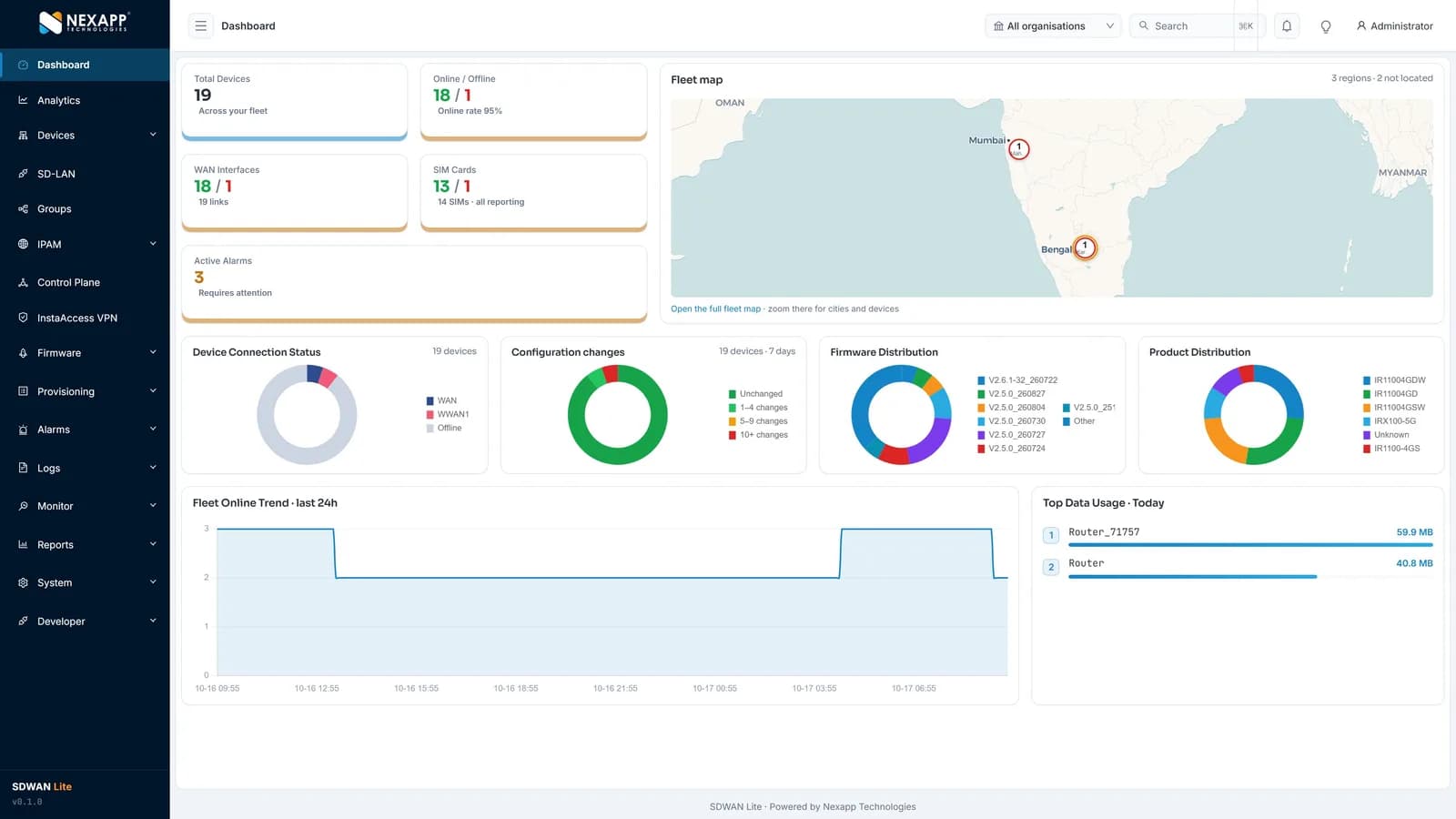
One screen shows the whole fleet: total devices and online rate, WAN links and SIM cards, active alarms, a fleet map, firmware versions, configuration changes, product mix and data usage. Instaroute SDWAN Lite 2.0 manages up to 100,000 routers per deployment, hosted by Nexapp in India or self-hosted.
How is it deployed?
A typical rollout takes 4 steps, and routers configure themselves when they are powered on at site.
Find the signal
Check 5G signal on the roof or at mast height and choose the operator and mounting point.
Mount the outdoor unit
Fix the IRX1160-ODU-5G on a pole or mast and run one Ethernet cable from its PoE LAN port to the router indoors.
Connect the office
The IRX100-5G indoors gives the office Gigabit ports and Wi-Fi 6, and both units configure themselves at power-on.
Add fibre later
When fibre arrives, plug it into any port; the router keeps 5G as the second path, switching on health checks.
What does the specification ask for, and how does Nexapp meet it?
These are the requirements buyers and tenders usually set for this application, and the Nexapp capability that meets each one today.
| Requirement | How Nexapp meets it |
|---|---|
| Office online before fibre | 5G SA/NSA as the primary link, zero-touch at power-on |
| Strong signal despite walls and basements | IRX1160-ODU-5G, IP65, mounted on a pole or mast |
| Simple cabling | One Ethernet cable from the outdoor unit's PoE LAN port to the router indoors |
| Office LAN and Wi-Fi | IRX100-5G with a five-port Gigabit combo and dual-band Wi-Fi 6 |
| Resilience once fibre arrives | Link backup, switch and load balance across fibre and 5G with health checks |
| Encrypted traffic | IPsec IKEv2 with hybrid ML-KEM key exchange |
Which Instaroute router should you use?
For most sites, use the IRX1160-ODU-5G. Outdoor IP65 5G unit for the roof or mast, with a PoE LAN port.
IRX1160-ODU-5G
Outdoor IP65 5G unit for the roof or mast, with a PoE LAN port.
- Cellular
- 5G SA/NSA, sub-6 GHz
- SIM slots
- 1
- RS232 / RS485
- No
- Mounting
- Outdoor, pole or mast
IRX100-5G
Indoor 5G router with five Gigabit ports and Wi-Fi 6 for the office.
- Cellular
- 5G SA/NSA, sub-6 GHz
- SIM slots
- 2
- RS232 / RS485
- RS232 and RS485 (up to 3 ports)
- Mounting
- Desktop or wall
IRX100-5Gv2
Dual-module 5G where two operators should be live at once.
- Cellular
- 5G SA/NSA, sub-6 GHz
- SIM slots
- 2
- RS232 / RS485
- RS232 and RS485 (up to 3 ports)
- Mounting
- Desktop or DIN-rail
Also used: Instaroute SDWAN Lite 2.0
What are the benefits?
- A new office opens on 5G instead of waiting for fibre.
- Better signal from a roof-mounted unit than from a router on a desk.
- One Ethernet cable from the roof unit into the building.
- Fibre joins later without replacing the hardware, and 5G becomes the backup.
- Signal, data usage and link health visible for every site in one console.
Why choose Nexapp?
- Indian OEM in Pune since 2014, with its own NexappOS and controller
- Class-I local supplier under the PPP-MII Order
- TEC MTCTE certificate 244903206 for nine Instaroute models
- Quantum-safe on every connection: hybrid ML-KEM and ML-DSA
- 24×7 NOC in Pune; hosted in India or self-hosted
- 75,000+ devices deployed for 400+ enterprise and banking customers
Frequently asked questions
What is 5G fixed wireless access?
It is a business internet connection delivered over the 5G mobile network to a fixed site, instead of over a cable or fibre into the building.
Why mount the 5G unit outdoors?
Walls, glass and basements weaken the 5G signal. An IP65 outdoor unit on the roof or a mast sits where the signal is strongest and sends the connection indoors over one cable.
Can 5G be the only link for an office?
Yes, as the primary link while fibre is awaited. Many sites then keep 5G as the backup, and the router switches to it on health checks when the fibre fails.
Does the outdoor unit need a separate indoor router?
Not always. The IRX1160-ODU-5G has one PoE LAN port, so a single device can connect to it directly. Pair it with an IRX100-5G indoors when the office needs several Gigabit ports, Wi-Fi 6 and a second 5G path.
How many SIMs does each unit take?
The IRX1160-ODU-5G takes one SIM; the IRX100 5G routers take two. Using a different operator on each gives the site two independent paths.
Read next
Planning a similar deployment?
Tell us your sites, devices and links, and a Nexapp engineer will recommend the routers and design.
Related use cases
Enterprise
4G/5G failover for branch offices4G/5G failover routers for NBFC, insurance, service and sales branch offices: dual-SIM backup, link load balancing and zero-touch rollout from one console.
Enterprise
Network connectivity and segmentation for hospitals and clinicsConnect hospitals, clinics and diagnostic centres with 4G/5G backup links, keep medical devices in their own zone and run guest Wi-Fi apart, from one console.
Enterprise
Secure remote access for building management systemsReach BMS, HVAC, lift, DG and boiler controllers remotely over 4G: Modbus and serial support, vendor access through ZTNA, and building systems kept apart.