

Transport and logisticsSDWAN Lite
4G/5G connectivity for drones, drone docks and ground control stations
Instaroute routers work with drones. At survey, inspection and security sites, a 5G router connects the drone ground control station or drone dock, so video and telemetry reach an operations centre through encrypted tunnels with no public IP on the SIM. Every dock, ground station and router is managed from Instaroute SDWAN Lite 2.0.
By Pradeep Tomar, Founder and CEO. Published , last reviewed .At a glance
- Industry
- Inspection, survey, security and agriculture drone operations
- Sites
- Drone docks, ground control stations, field vehicles
- Links
- 5G SA/NSA, dual SIM, two operators
- Routers
- IRX100-5G, IRX100-5Gv2, IRX1160-ODU-5G
How does the network connect?
Site equipment connects to an Instaroute IRX100-5G, which carries the traffic over 5G · Operator A and 5G · Operator B inside a quantum-safe tunnel to Operations centre and Video and data platform. Nothing on site accepts inbound connections.
What problem does it solve?
Drone operations happen where there is no office network: along pipelines and power lines, on farms, at mines and construction sites, and at the perimeter of large campuses. The ground station or dock still needs a link to the operations centre.
Video and telemetry are only useful if they reach the people who act on them, and a phone hotspot at the ground station is not something an operations team can manage or secure.
Drone docks are left unattended in the field, so the team needs to see link health and reach the dock without a visit.
How does Nexapp solve it?
Instaroute 4G/5G routers work with drones: connect drone docks and ground control stations and send video and telemetry to your operations centre, encrypted.
A link for the dock and ground station
An Instaroute IRX100 5G router connects the drone dock or ground control station over Gigabit Ethernet or Wi-Fi 6, with dual-SIM arbitration by signal, latency or data usage between two operators.
Video and telemetry to the operations centre
Video and telemetry travel from the ground station or dock to the operations centre inside encrypted tunnels, with no public IP on the SIM and no port open at the site.
An outdoor unit where the signal is weak
Where the dock sits in a weak-signal spot, the IRX1160-ODU-5G mounts on a pole or mast close to the best 5G signal and connects to the site over one Ethernet cable.
Unattended docks you can still reach
Alarms for link state, signal and data usage flag a dock that has gone quiet, and engineers reach it through InstaAccess over the encrypted tunnel, with every session logged.
One console for every site
Instaroute SDWAN Lite 2.0 shows the health, signal and data usage of every router, with zero-touch set-up and canary firmware rollout, for up to 100,000 devices per deployment. Run it Nexapp-hosted in India or self-hosted.
How is the site secured in the AI era?
Security is a requirement, not an add-on. AI helps attackers find exposed devices and weak access faster than ever, so this design exposes nothing, encrypts every link and checks every person who connects.
Nothing exposed to the internet
The router opens only outbound, encrypted connections. Equipment on site has no public IP and accepts no inbound connections, so automated scanners have nothing to find. Zero trust access
Quantum-safe encryption on every link
Traffic travels in IPsec IKEv2 tunnels with hybrid ML-KEM key exchange, so data captured today cannot be decrypted later. Post-quantum cryptography
Zones, not one flat network
Drone dock, ground control station and site cameras sit in their own zones behind the zone firewall, so one compromised device cannot reach the rest. IoT and OT security
Access for people, not networks
Engineers and vendors connect through InstaAccess to the named equipment they support, and every session is logged. SSE and ZTNA
Signed, staged firmware
Instaroute SDWAN Lite 2.0 rolls out post-quantum-signed firmware to a canary group first, with rollback, so a bad update never reaches every site at once. Instaroute SDWAN Lite 2.0
AI that waits for your approval
NexParth AI spots problems and proposes the fix, and nothing changes until a person approves it. NexParth AI
What does the SDWAN Lite dashboard show?
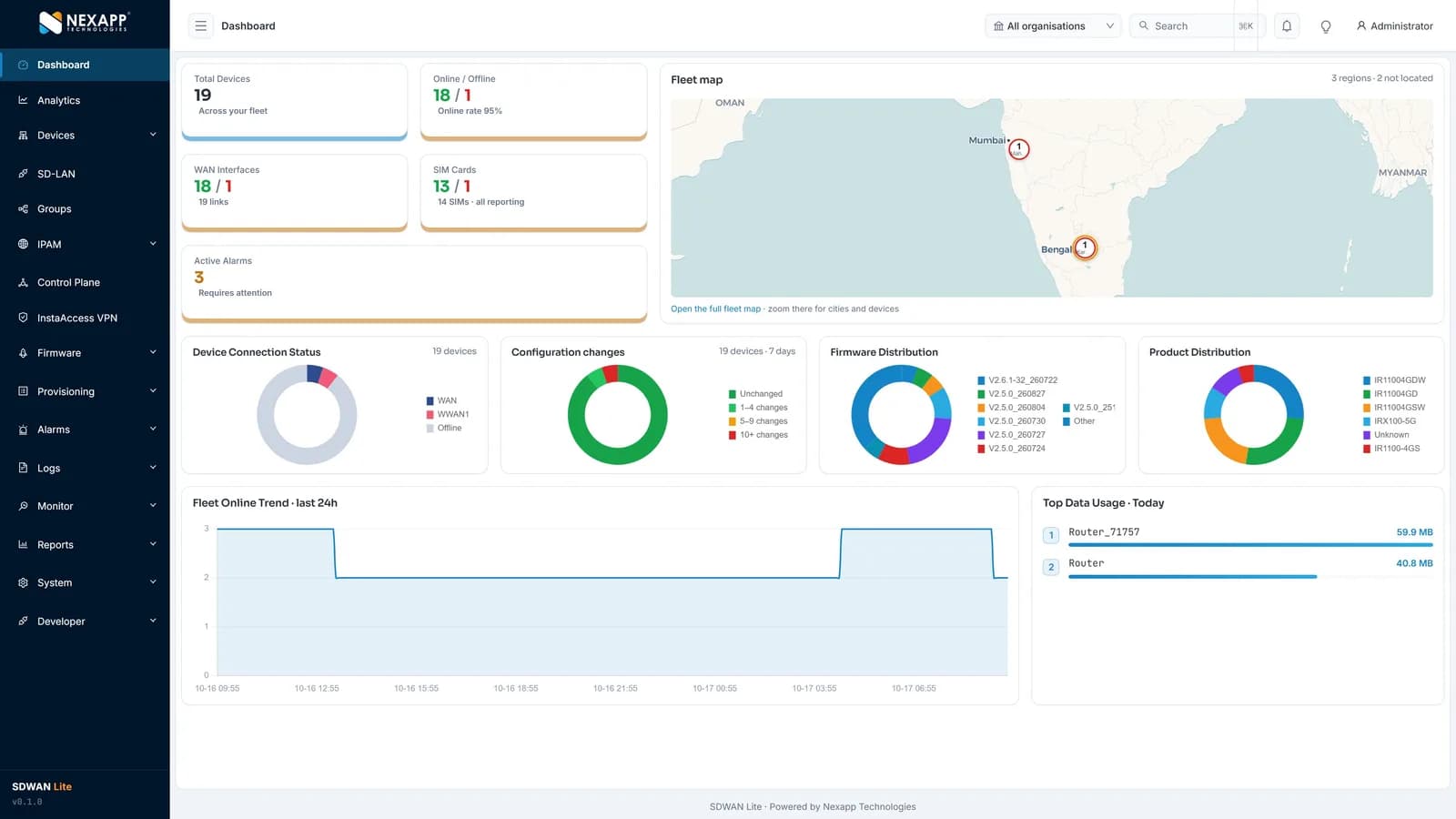
One screen shows the whole fleet: total devices and online rate, WAN links and SIM cards, active alarms, a fleet map, firmware versions, configuration changes, product mix and data usage. Instaroute SDWAN Lite 2.0 manages up to 100,000 routers per deployment, hosted by Nexapp in India or self-hosted.
How is it deployed?
A typical rollout takes 5 steps, and routers configure themselves when they are powered on at site.
Survey the site
Check 5G signal from two operators at the dock or ground station location, and decide whether an outdoor unit is needed.
Plan the connection
Connect the dock or ground station to the router over Ethernet or Wi-Fi. Where the 5G signal at the site is weak, plan an IRX1160-ODU-5G on a pole or mast.
Install and power on
The router pulls its configuration zero-touch and builds encrypted tunnels to the operations centre.
Send video and telemetry
Video and telemetry flow from the site to your operations centre or platform inside the tunnel.
Watch the sites
Alarms for link state, signal and data usage flag a dock that has gone quiet, backed by the 24×7 NOC in Pune.
What does the specification ask for, and how does Nexapp meet it?
These are the requirements buyers and tenders usually set for this application, and the Nexapp capability that meets each one today.
| Requirement | How Nexapp meets it |
|---|---|
| A link for the dock or ground station | IRX100 5G router with Gigabit Ethernet and Wi-Fi 6 |
| Video and telemetry to operations | IPsec IKEv2 tunnels with hybrid ML-KEM; no public IP needed |
| Two operators at remote sites | Dual-SIM arbitration; two modules on the IRX100-5Gv2 |
| Weak signal at the dock site | IRX1160-ODU-5G outdoor IP65 unit on a pole or mast |
| Engineer access to docks | InstaAccess (ZTNA, SSL VPN or IPsec VPN) through the encrypted tunnel, logged |
| Manage every site | Instaroute SDWAN Lite 2.0, hosted in India or self-hosted |
Which Instaroute router should you use?
For most sites, use the IRX100-5G. 5G with Gigabit ports and Wi-Fi 6 for a ground control station or dock.
IRX100-5G
5G with Gigabit ports and Wi-Fi 6 for a ground control station or dock.
- Cellular
- 5G SA/NSA, sub-6 GHz
- SIM slots
- 2
- RS232 / RS485
- RS232 and RS485 (up to 3 ports)
- Mounting
- Desktop or wall
IRX100-5Gv2
One or two 5G modules, so two operators stay live for critical operations.
- Cellular
- 5G SA/NSA, sub-6 GHz
- SIM slots
- 2
- RS232 / RS485
- RS232 and RS485 (up to 3 ports)
- Mounting
- Desktop or DIN-rail
IRX1160-ODU-5G
Outdoor IP65 5G unit on a pole or mast at the dock site, where the 5G signal is strongest.
- Cellular
- 5G SA/NSA, sub-6 GHz
- SIM slots
- 1
- RS232 / RS485
- No
- Mounting
- Outdoor, pole or mast
Also used: Instaroute SDWAN Lite 2.0 · InstaAccess client (ZTNA, SSL VPN, IPsec VPN)
What are the benefits?
- Ground stations and docks connect where there is no wired network.
- Video and telemetry reach the operations centre encrypted.
- Two operators back each other up at remote sites.
- Unattended docks are monitored and reached without a site visit.
- Every dock and ground station is managed from one console.
Why choose Nexapp?
- Indian OEM in Pune since 2014, with its own NexappOS and controller
- Class-I local supplier under the PPP-MII Order
- TEC MTCTE certificate 244903206 for nine Instaroute models
- Quantum-safe on every connection: hybrid ML-KEM and ML-DSA
- 24×7 NOC in Pune; hosted in India or self-hosted
- 75,000+ devices deployed for 400+ enterprise and banking customers
Frequently asked questions
Do Instaroute routers work with drones?
Yes. They connect drone ground control stations and drone docks over 4G or 5G and carry video and telemetry to your operations centre in encrypted tunnels.
Can drone video reach our operations centre over 4G or 5G?
Yes. The router carries video and telemetry from the ground station or dock to the operations centre through encrypted tunnels, without a public IP on the SIM.
Which router suits a drone dock?
The IRX100-5G for most docks and ground stations, with 5G, Gigabit ports and Wi-Fi 6. Choose the IRX100-5Gv2 where two operators must be live at once, and add the IRX1160-ODU-5G on a mast where the signal at the dock is weak.
Does the router control the drone?
No. The drone's own ground control software flies it; the router provides the managed network link and its security.
Who is responsible for flight permissions?
The drone operator. Flights must follow the applicable aviation rules; Nexapp supplies the connectivity.
Read next
Planning a similar deployment?
Tell us your sites, devices and links, and a Nexapp engineer will recommend the routers and design.
Related use cases
Transport and logistics
Warehouse Wi-Fi and connectivity for scanners, AGVs and the WMSWarehouse networks for handheld scanners, AGVs, AMRs and the WMS: Wi-Fi 6 at the edge, separate device segments, and fibre plus 5G links to the data centre.
Transport and logistics
Connectivity for cold rooms and cold-storage temperature monitoring4G routers that carry cold-room and chiller readings over Modbus, serial or MQTT to your platform, on two operators, with alarms when a site goes quiet.
Transport and logistics
Connectivity for ports, container terminals and gate automation4G and 5G links for container yards, gates and crane controllers: IP65 outdoor units, gate OCR cameras on 5G, PLC data over Modbus, segmented zones.